Connect EuroMetrics to ChatGPT, Claude or Grok and ask about your website's traffic in plain language: "How many visitors did my site have last month?", "Why did traffic drop on Tuesday?". The assistant reads your reports and cannot change anything. Available on every plan, including the free one.
You need: a EuroMetrics account with at least one website, and an assistant account that can add custom MCP servers (connectors).
The server address is the same for every assistant:
https://app.eurometrics.eu/api/mcp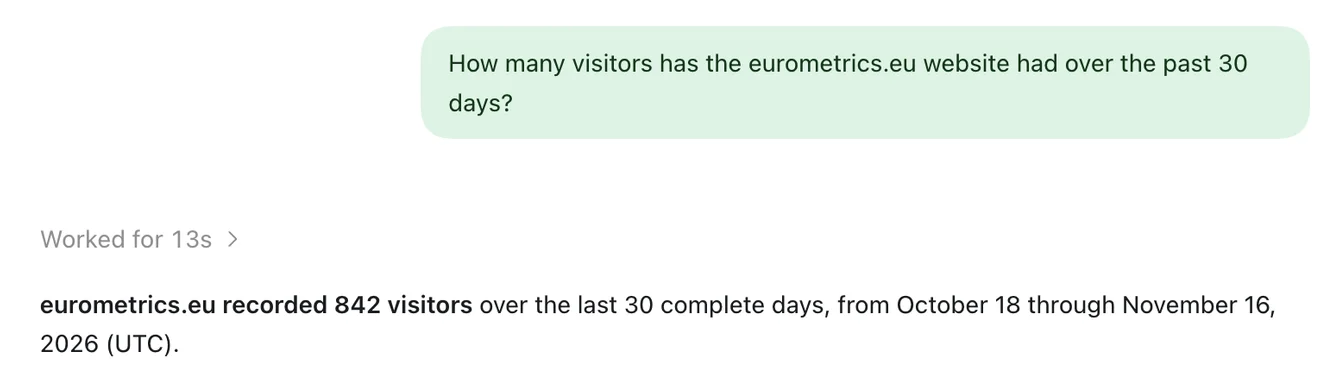
Connect Claude
- Open Claude → Settings → Connectors.
- Click Add custom connector.
- Name:
EuroMetrics. Remote MCP server URL:https://app.eurometrics.eu/api/mcp. Leave the advanced (OAuth client) fields empty. - Click Add, then Connect. A EuroMetrics window opens.
- Sign in with your password or a sign-in link by email. Open the link in the same browser: it brings you back to the consent screen.
- Tick the websites the assistant may read and click Allow.
- Back in Claude the connector shows as connected. Ask: "How many visitors did my site have in the last 30 days?"
Connect ChatGPT
- Open ChatGPT → Settings → Plugins (in some versions: Apps or Connectors) and choose Add custom MCP server.
- Name:
EuroMetrics. Connection: Server URLhttps://app.eurometrics.eu/api/mcp. Authentication: OAuth. Leave the advanced OAuth settings as they are. - Tick I understand and want to continue and click Create.
- Sign in to EuroMetrics, tick the websites and click Allow.
- Start a new chat, select EuroMetrics and ask your question.
If you add the server in the MCPs list of the ChatGPT desktop app instead, switch Type to Streamable HTTP before you fill in the form. With the default type STDIO the address is treated as a program to run on your computer, and ChatGPT tries to open the website in a browser instead of reading your reports.
Connect Grok
- Open Grok → Settings → Connect Apps → Add MCP Server.
- Name:
eurometrics. Server URL:https://app.eurometrics.eu/api/mcp. Leave Headers empty. - Click Add MCP. A EuroMetrics sign-in window opens: sign in, tick the websites, click Allow.
- EuroMetrics appears under Connect Apps as Connected. Ask your question in a new chat.
Grok opens the sign-in in a pop-up window. If pop-ups are blocked, Grok reports a problem connecting to the server: allow pop-ups and click Add MCP again.
What you can ask
Question | What the assistant uses |
|---|---|
How did my site do last month? | Overview: visitors, visits, pageviews, bounce rate, visit time, change against the period before |
Show daily visitors for the last 3 months | Trend by hour, day or month, with unusual days flagged |
Where does my traffic come from? Top pages? Countries? | Breakdown by one dimension, with each value's share and change |
Why did traffic drop last week? | The change explained by channel, page, country and device |
How is /pricing doing? | Page report: views, entries, exits, sources, devices |
How many signups this month? Conversion by country? | Goal performance for your saved goals |
Where do people drop out of checkout? | Funnel report for your saved funnels |
Anything unusual lately? | Days compared with the same weekday of the previous 8 weeks |
Which sites the assistant sees
- Only the sites you ticked on the consent screen, and only while you still have access to them in EuroMetrics.
- The list you can tick is the same as in your dashboard: your own sites, your teams' sites, and every site of your organization if you are an organization admin.
- New sites are not added automatically. To add one, connect again and tick it.
Disconnect
- In EuroMetrics: Settings → Connected apps → Disconnect. It takes effect immediately.
- You can also remove the server in the assistant. Changing your EuroMetrics password disconnects every assistant.
- Each connection is listed separately. ChatGPT in the chat and ChatGPT in Codex, for example, are two connections. A connection that has not been used for 30 days ends by itself.
Data and privacy
- Your analytics data stays on EuroMetrics servers in the EU, and every number is calculated there.
- The assistant receives aggregated figures for the question asked: totals, top pages, sources, countries. Never IP addresses, visitor ids or individual sessions.
- Those figures are processed by your assistant's provider (OpenAI, Anthropic or xAI, all in the US) under your agreement with them. If a site's numbers must not reach them, do not tick that site.
- The assistant has read-only access. Each connection is limited to 60 requests a minute.
Getting the numbers right
- Name the site and the period: "visitors on shop.example in October" works better than "how are we doing". If you have one site, the assistant picks it on its own.
- Set your site's time zone in the website's settings in EuroMetrics. Without it, days are counted in UTC.
- "Last 30 days" in the assistant means 30 full days up to yesterday. The dashboard's "Last 30 days" includes today so far, so choose the same dates when you compare the two.
Troubleshooting
What you see | What to do |
|---|---|
After the sign-in link you land on the login page again | Open the link in the same browser where you started connecting. |
Claude: "Authorization with this connector failed" | The connection attempt timed out. Click Connect again. |
Grok: "There was a problem connecting to this MCP server" | Pop-ups are blocked. Allow pop-ups and add the server again. |
ChatGPT wants to open app.eurometrics.eu in its browser | The server was added with the type STDIO. Remove it and add it again as Streamable HTTP, or with Add custom MCP server and OAuth. |
"No websites" on the consent screen | Your account has no websites you can view yet. Add a site first. |
The assistant says a site is not found | The site was not ticked when you connected. Connect again and tick it. |
The numbers differ from the dashboard | Check the dates and the site's time zone (see above). |
The assistant stopped working | The connection was ended (Disconnect, password change, 30 days without use). Connect again. |
For developers
The server implements the Model Context Protocol, revision 2025-11-25, over Streamable HTTP, with OAuth 2.1 (PKCE, Client ID Metadata Documents and Dynamic Client Registration). Protected resource metadata: https://app.eurometrics.eu/.well-known/oauth-protected-resource/api/mcp. For a client that needs a fixed client id and secret, create one under Settings → Connected apps → Custom OAuth clients.
More about the feature: AI Assistants.